Using Exercises and Mixed Modal Training in Program Design
Do you program strength or resistance training workouts, aerobic or conditioning circuits, or both? Either way, CoachRx coaching software gives you the freedom to design balanced training programs that include both individual exercises and mixed modal circuits.
Do you program strength or resistance training workouts, aerobic or conditioning circuits, or both? Either way, CoachRx gives you the freedom to design balanced training programs that cover all characteristics of fitness.
Program Design Pro Tip: Exercises vs Mixed Modal
When you start designing a workout, either on your client’s training calendar or in the programs index, you’re given two options: +Exercise or +Mixed Modal.
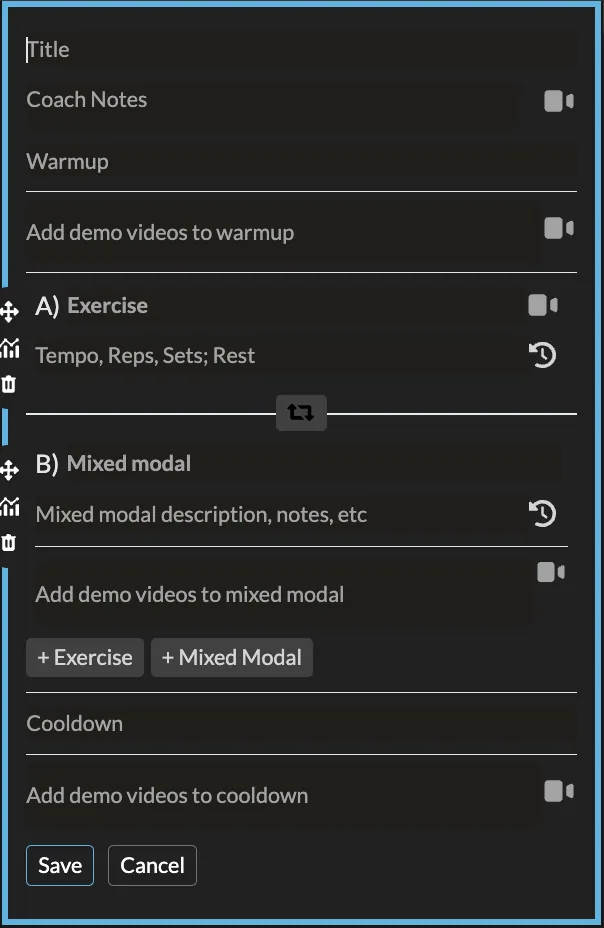
Exercise
Adding an exercise is your best bet when designing a resistance exercise training program, whether the intention is strength, hypertrophy, muscle endurance, or skill development.
- Click +Exercise
- Begin to type the name of the exercise you're prescribing. If it appears in the dropdown, it means there is a video available. Select this so your client is provided with a demo video.
- No video? No problem! Type the name of the exercise and then click the +camera icon to add your own YouTube or Vimeo link. (FYI: you can also add videos from the exercise Index.)
- Next, add tempo, reps, sets, and rest to the description box. (E.g. @30X0, 8 reps x 3 sets; rest 90 seconds.) You can also add additional notes, such as cues or a request for your client to record a video.
- Want to superset, tri set, or giant set exercises? Click the circular arrow icon between exercises to pair them.
Mixed Modal
The mixed modal feature is designed to be used when designing energy systems workouts, circuits, and other conditioning-focused sets.
-
Click +Mixed Modal
-
Title your session (e.g. Bike Intervals, 30 minute AMRAP, 10 minute EMOM, Easy Aerobics, For Time/Completion)
-
Write a description of the piece, for example:
@ 80% effort
5 Rounds
400m Row
10 Ball Slams
OR
@ sustained pace
5 minute Stairmaster
Rest 2:30 mins
x 5 Sets
-
Write any additional cues, notes on execution, or requests for feedback in the description box, too.
-
Add any necessary demo videos for the exercises included by typing their names and selecting them in the “add demo videos” field. (Like Exercises, you can add your own here too.)
Keep in mind that you can assign both exercises and mixed modal pieces in one workout, so if your clients start their session with an A1/A2, B1/B2 of resistance training, they can then end with a C aerobic circuit.
CoachRx offers a versatile program design platform that allows you to create balanced training programs that cover all aspects of fitness, whether it be strength or resistance training workouts, aerobic or conditioning circuits, or both. With the option to choose between exercises and mixed modal pieces, you can easily customize your client's program to their specific needs and goals and provide them with clear instructions that make training a breeze.
Start your free trial of CoachRx and upgrade your programming flow with this tip today!

More in Program Design Pro Tip.
Deliver the coaching
you're capable of.
Try CoachRx free and see what changes when every part of your practice is in the same place.